Project Data Field Relationships and Business Rules
The Relationship Administration section describes how to set up relationships among Product, Attribute and Phrase values in the database.
In order to use these relationships in a project scenario, you also need to relate the respective project data fields that will operate on these relationships.
This allows us to control when database relationships will be employed.
Adding/Removing Data Field Relationships
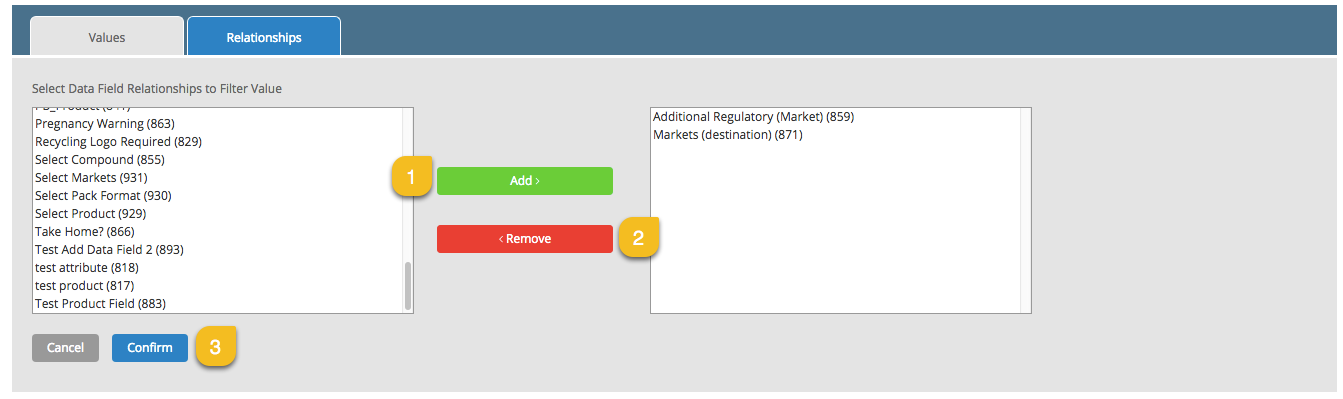
To add/remove relationships select the linked data fields from the Add/Edit Data Field page for the Product, Attribute or Phrase field. The same relationships are displayed regardless of the section in which it is configured. A Product field – Attribute field relationship can be edited from the Add/Edit Data Field page for either the Product Field or Attribute Field.
|
|
Description |
|---|---|
|
1 |
Select data field from left hand list and click on Add to select. |
|
2 |
Select data field from right hand list and click on Remove to remove. |
|
3 |
Click on Confirm to save changes. |
 more
more